▰
▰
JPG
PDF
MP4
✳Files, in focus.
Browse buckets and folders, search what you need, sort your way, and preview images, PDFs, video, and more.
 Cairn Vault
Bring your S3 storage into a file workspace that feels like home. Browse, preview, and move your files with clarity and control.
Your storage is powerful. Getting around in it shouldn’t feel like work. Cairn gives your S3-compatible buckets a thoughtful home for the everyday things you do with files.
Meet your new workspace ↗Your files, right where you left them.
Simple tools for the real work of keeping your files close, organized, and yours.
Browse buckets and folders, search what you need, sort your way, and preview images, PDFs, video, and more.
Choose client-side encryption for new uploads. Your key stays on your device; file and folder names remain visible in your bucket.
Run a sync when you’re ready. Review conflicts and choose whether to keep the device copy, cloud copy, or both.
On supported desktop platforms, mount a bucket in Finder or File Explorer with Cairn’s rclone-powered connection.
Get set up, find what you need, and keep control of every sync.
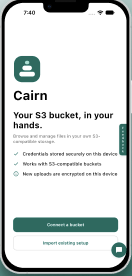
Browse your S3 files in one place.
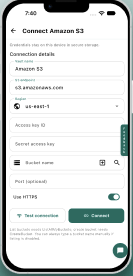
Choose a provider and test access.
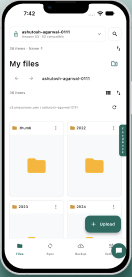
Search, sort, and preview in Cairn.
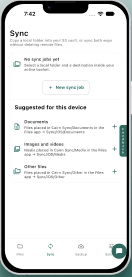
Run syncs when ready. Resolve conflicts your way.
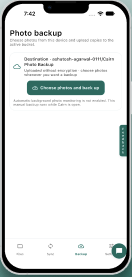
Choose photos to back up to S3.
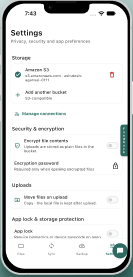
Manage storage, encryption, and app lock.
When you turn on encryption, Cairn encrypts new file contents on your device before upload. Your password isn’t saved, so keep it somewhere safe: Cairn can’t recover it for you.
No new storage to learn. Connect the bucket you use and make Cairn your everyday window into it.
Choose your S3 provider and enter your bucket and access details.
Browse folders, search across your files, and preview right inside Cairn.
Upload, download, back up photos, or start a sync whenever you choose.
We’re getting the store listings ready. Check back soon to download Cairn Vault.
Cairn works with S3-compatible storage, including AWS S3, Cloudflare R2, Backblaze B2, Wasabi, and MinIO.
No. Content encryption is optional and off by default. If you enable it, Cairn encrypts new file contents on your device before upload. Names and paths remain visible to your storage provider.
Sync jobs are started on demand while Cairn is open. Automatic scheduled background sync and deletion propagation are not currently available.
Plaintext objects can use presigned links. Cairn does not currently offer a recipient-side encrypted sharing flow; encrypted files cannot be shared as usable decrypted links.

